iMobie PhoneRescue Review 2026: Is It Safe to Recover iPhone Data?
Jason Kim | 3 min read | Updated: Aug 19, 2026
Table of contents
If you’re reading this iMobie PhoneRescue review, you’ve probably already lost something important—maybe years of WhatsApp conversations, family photos, or Facebook Messenger messages. You’re not alone. In our latest real-world test, we used PhoneRescue for iOS to recover exactly that kind of data from an aging iPhone with degraded storage.
Spoiler: it found the files—but couldn’t restore them properly.
This isn’t a sponsored overview. It’s a hands-on, no-fluff evaluation of whether iMobie PhoneRescue truly works in 2026… and when you should walk away before wasting $60, or if you should switch to a more reliable PhoneRescue alternative before your data is overwritten forever.
Why Trust Us
Our team consists of trusted data recovery experts with over a decade of experience. We have independently tested and reviewed more than 20 recovery apps and spent thousands of hours analyzing their ability to recover lost or deleted files. Every review we publish is unbiased, transparent, and free from financial influence. Our mission is simple: to deliver honest data recovery reviews that help you choose the right tool for your specific needs.
Apps Tested
20+
Testing Hours
3,000+
Years in Data Recovery
10+
[Quick Verdict]
Overall Rating: ⭐⭐⭐ (3.2/5)
Best For: Very recently deleted standard photos (limited success).
The Deal Breaker: Failed to recover Facebook Messenger and Instagram data in our tests; blurry photo recovery.
Better Choice: [Gbyte Recovery] – 92% Success rate for 15+ Social Apps.
Quick Take on iMobie PhoneRescue
At first glance, iMobie PhoneRescue appears to be a solid all-in-one solution—it supports both iOS and Android, offers a clean interface, and even includes basic iOS repair features. For casual users recovering recently deleted photos, it might suffice.
But in our iMobie PhoneRescue review test, critical flaws emerged:
⚠️ Recovered photos were often blurry or corrupted, rendering them useless.
⚠️ Facebook Messenger, Instagram, and Snapchat data were completely unsupported—a dealbreaker for modern users.
⚠️ The so-called “iCloud recovery mode” simply mirrored iCloud.com, offering zero added value.
⚠️ A misleading “not enough disk space” error appeared despite 100GB+ free space.
In short, PhoneRescue looks polished but underdelivers where it counts—especially for social app data or older deletions. Additionally, if you want a comprehensive overview of all top recovery tools, check out our best iPhone data recovery software comparison where we rank and test 10+ tools side-by-side.
What Is PhoneRescue & How Does It Actually Work?
Many users ask, "What is PhoneRescue?" and more importantly, "Does it actually work?" While iMobie markets it as an all-in-one savior for iPhone and Android, our hands-on testing with PhoneRescue for iOS revealed a significant gap between marketing claims and real-world recovery success.
Here is exactly how the recovery process really works—and where users may run into problems, and why the process might leave you more frustrated than before.
⚠️ Note: Despite its claims, PhoneRescue does not support Facebook Messenger or many of the newer social apps, which can be a limitation for users relying on these platforms.
The software claims can recover:
Personal data – contacts, messages, and call history
Media files – photos, videos, and music
App data – limited support for WhatsApp, Line, and Kik on iOS
The Reality of Using iMobie PhoneRescue: Step-by-Step Test Results
We skipped promotional demos and conducted a controlled stress test of PhoneRescue for iOS using a device with six months of deleted WhatsApp history and a cache of previously blurred photos. The goal was simple: assess whether PhoneRescue can reliably recover real-world data—not just detect it. Here’s what we found.
Step 1. Setup and Privacy Implications
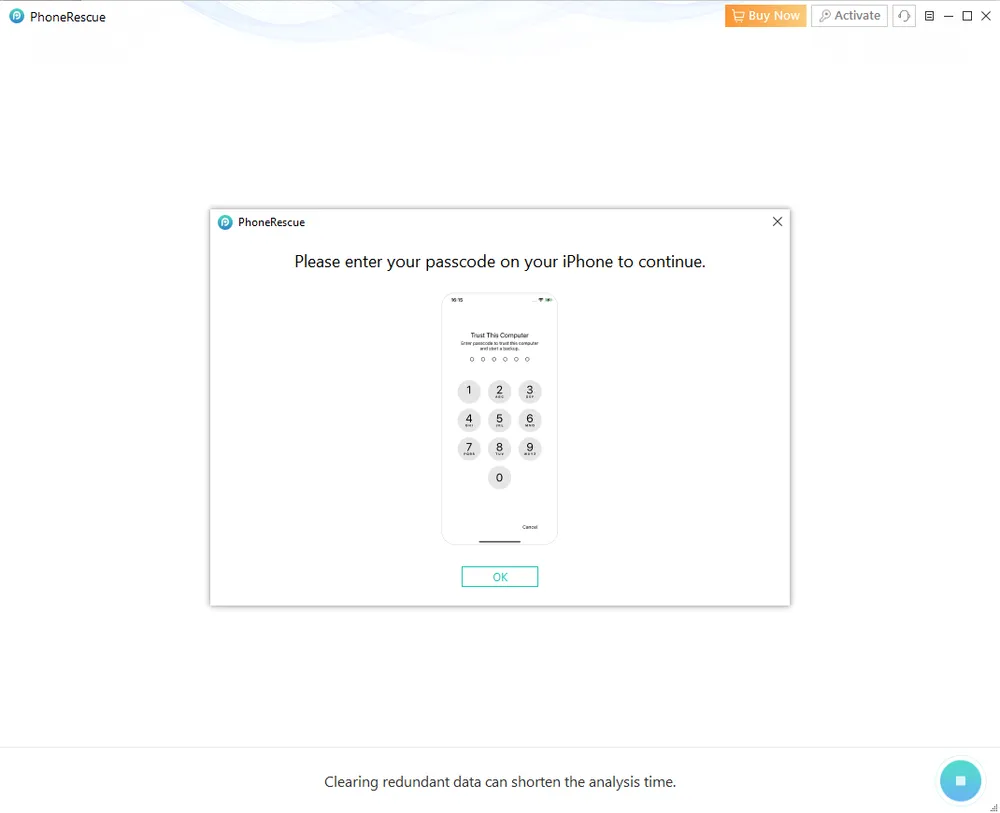
The PhoneRescue download and installation process is straightforward. However, during initial setup, the software requires you to enter your iPhone passcode to proceed with device-level scanning.
Why this matters:
Granting a third-party tool full passcode access gives it deep system permissions. From a data-privacy perspective, this represents a high-trust requirement—especially for users recovering sensitive personal or business data.
How Gbyte differs:
Gbyte Recovery operates through secure Apple ID–based snapshot analysis, often eliminating the need for direct passcode access to the device itself. This approach reduces privacy exposure while still enabling deep recovery.
Step 2. Data Type Selection: Critical App Gaps
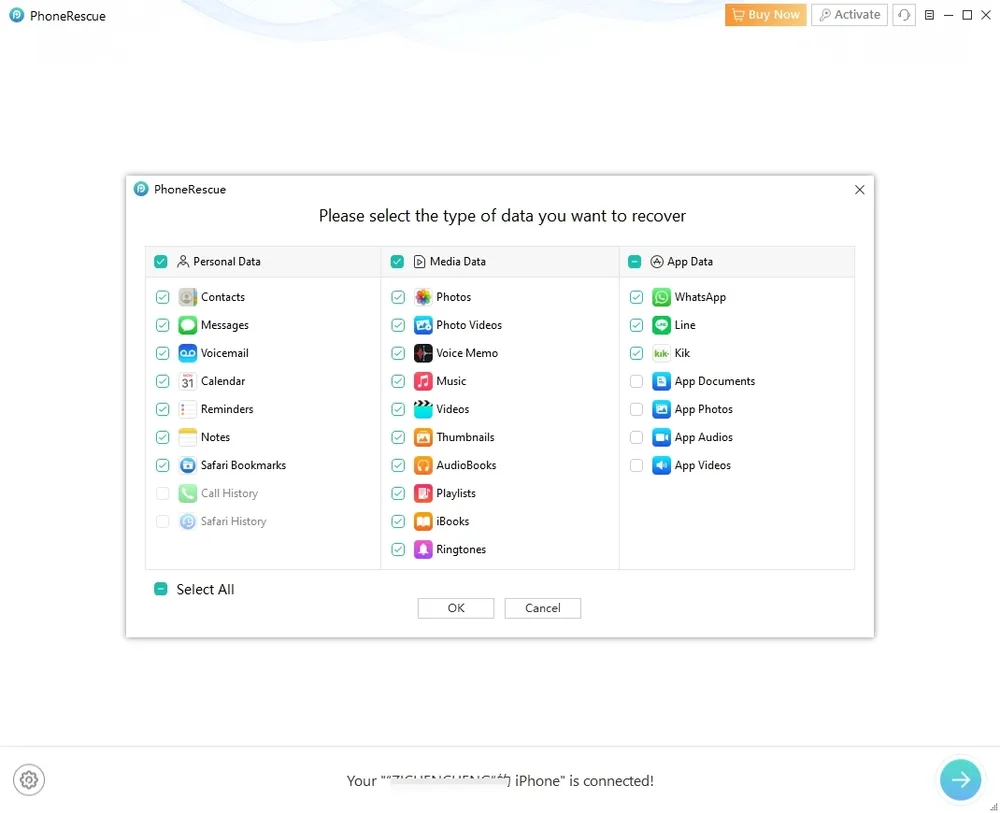
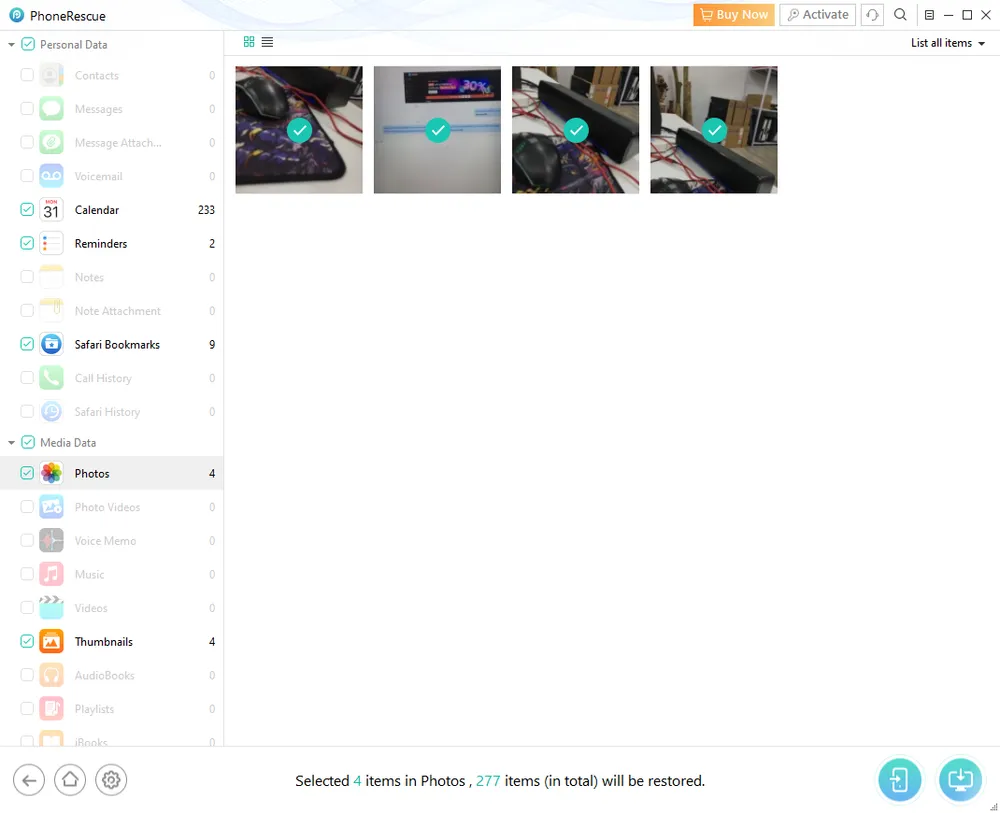
PhoneRescue allows users to select recovery targets across Personal Data, Media Data, and App Data categories.
The limitation: Despite this structure, Facebook Messenger, Instagram, and Snapchat are not supported at all. These apps are absent from PhoneRescue’s recovery framework.
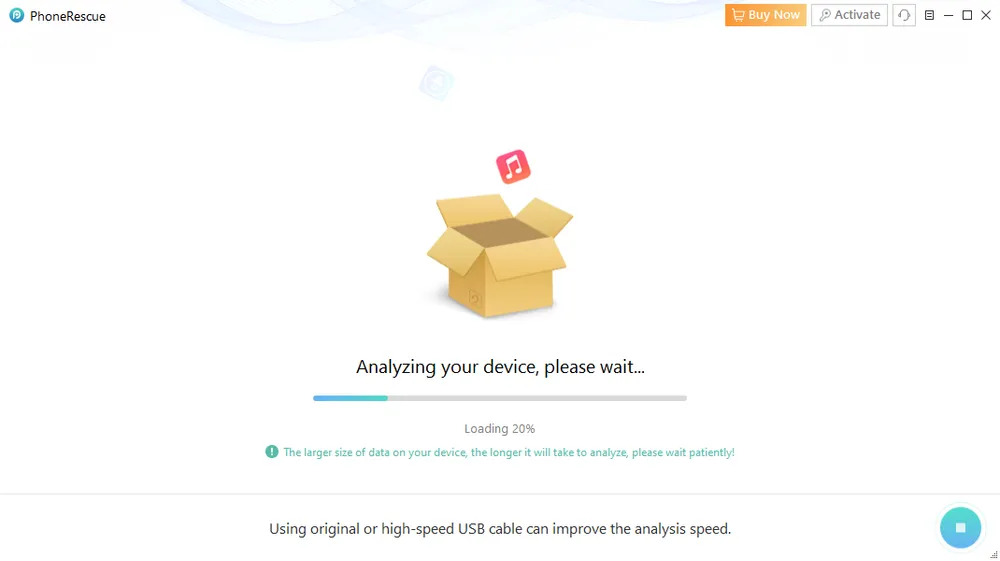
The consequence: Users may complete a full scan—often taking 20–30 minutes—only to discover that the specific app data they need was never recoverable in the first place. For modern social app recovery, Gbyte Recovery provides broader and more relevant support.
Step 3. Scanning Process: Misleading System Errors
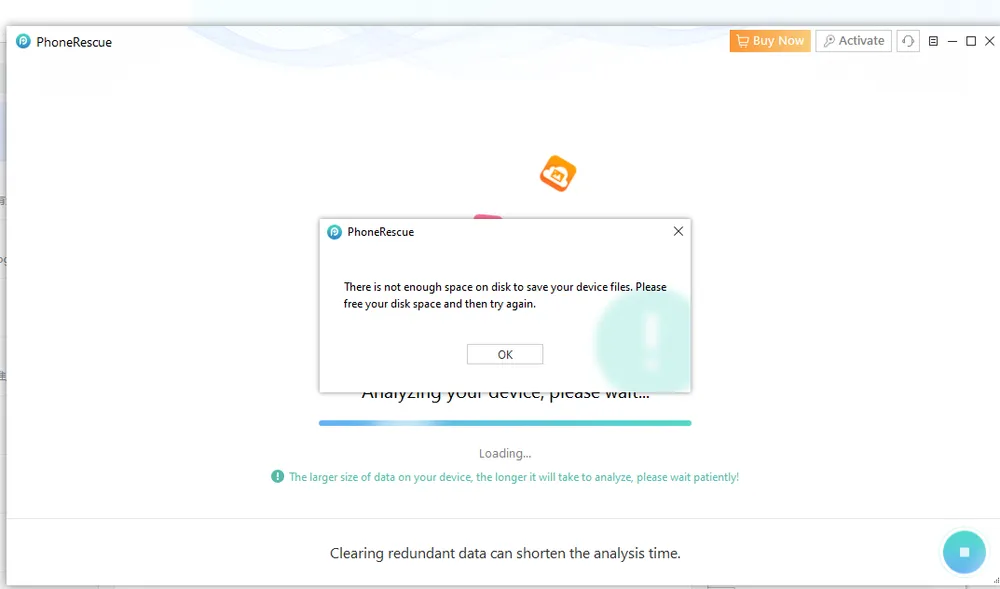
During testing, PhoneRescue repeatedly displayed a “Not enough disk space” error on our Mac, even though more than 100 GB of free space was available.
Why this is a problem:
This error forces users to restart the entire scan. In data recovery scenarios, repeated retries are more than an inconvenience—they increase the risk of data being overwritten by system processes.
The real cost:
Time lost during failed scans can permanently reduce recovery success, especially for recently deleted or partially overwritten files.
Step 4. Recovery Results: Detection vs. Usability
PhoneRescue often succeeds in detecting deleted photos and displaying them in the preview window.
The critical distinction:
Detection does not equal recovery. In our test, many photos that appeared recoverable were ultimately restored as blurred, low-resolution images or corrupted files.
If photo recovery is your main priority and you're disappointed by PhoneRescue's blurry results, our best software to retrieve deleted photos from iPhone guide compares tools specifically optimized for high-quality photo restoration.
Why this matters financially:
Paying $60 to recover an image that is no longer recognizable defeats the purpose of data recovery. What users are truly paying for is data reconstruction accuracy, not just scan visibility.
This is where recovery technology—not marketing claims—makes the real difference.
PhoneRescue iCloud Backup Mode: Adds Cost—but Not Value
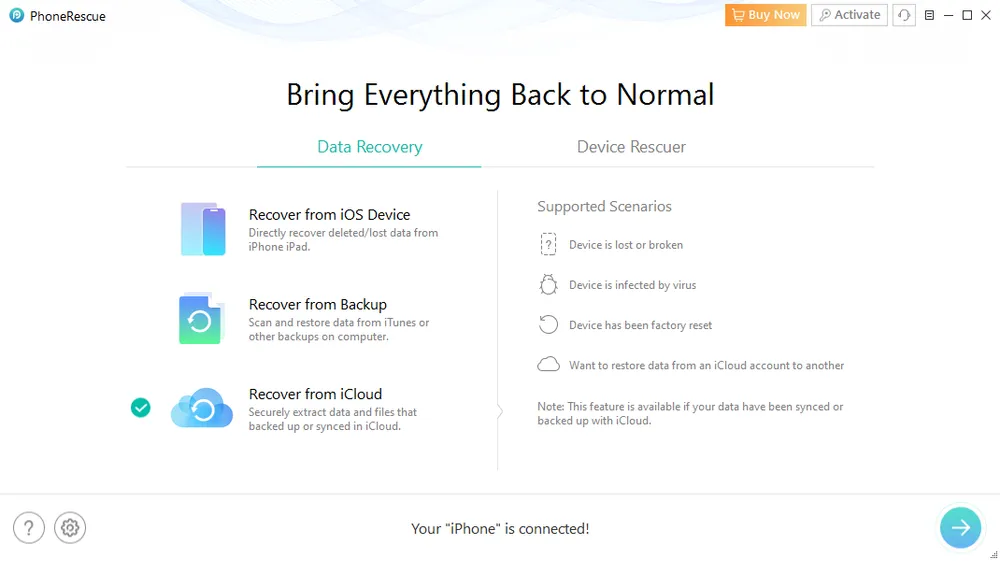
During our evaluation, we tested PhoneRescue’s “Recover from iCloud” mode expecting deeper access than Apple’s free tools. What we found was disappointing—and revealing.
The Reality: It’s Just a Mirror of iCloud.com
What iMobie markets as an "advanced" recovery feature is, in reality, a redundant interface. The files, photos, and messages presented in this mode are identical to what you can see for free by simply logging into iCloud.com on any browser.
Why pay $60 for PhoneRescue to view what Apple already shows you for free?
In practical terms, this feature offers zero technical advantage over Apple’s native service while adding unnecessary complexity.
⚠️ Critical Risk: Unexpected Device Resets
The most alarming discovery occurred during our second recovery attempt. Instead of retrieving data, PhoneRescue triggered a full device reset, wiping settings and cached data without warning.
Whether this was a software bug or a design flaw, the conclusion is clear: this mode introduces severe operational risks to your current data. For a tool meant to save data, causing a device wipe is an unforgivable failure.
Pricing Plan: How Much Is PhoneRescue?
Over the past three months, PhoneRescue’s pricing has increased significantly—by roughly 31% for the monthly plan and 31–32% across annual and one-time licenses.
Plan Type
Sep 28, 2026 Price
Jan 13, 2026 Price
Approx. Increase
1-Month Subscription
—
$60.25
—
3-Month Subscription
$45.99
—
—
1-Year Subscription
$49.99
$65.49
+31%
One-Time License
$69.99
$91.69
+31%
Note: As of January 2026, the 3-month subscription option has been discontinued and replaced with a new 1-month plan. Overall pricing has risen significantly across all available options.
💡 Budget-conscious? Before paying $60+ for PhoneRescue, explore our best free iPhone recovery tools roundup. Several options offer free scans and limited recovery that might be enough for your needs.
Considering the inconsistent recovery results and limited app support, PhoneRescue’s pricing presents a high cost-to-success ratio, especially for users recovering older or app-based data.
⚠️ The Money-Back Guarantee is not as simple as advertised.
60-day refund applies only to the 3-month plan.
30-day refund applies to the 1-year and one-time license.
Compared with other tools, PhoneRescue’s value is questionable given its limitations.
A Superior Alternative to PhoneRescue: Gbyte Recovery
While PhoneRescue works in limited scenarios, our testing showed clear gaps in app support, recovery depth, and reliability. For users who need a higher success rate on iPhone—especially for Messenger and older deletions—Gbyte Recovery proved to be a more capable alternative.
What Makes Gbyte Recovery Different?
Gbyte Recovery is a professional mobile data recovery tool built specifically for modern iOS challenges. Unlike traditional iPhone recovery tools such as PhoneRescue for iOS, Gbyte Recovery uses snapshot-based iCloud analysis to locate deleted data across historical system states.
If you’ve already tried PhoneRescue—or are about to—you need to know this: your data may still be recoverable, even if PhoneRescue failed.
Comparison: PhoneRescue vs. Gbyte Recovery
To help you understand why Gbyte provides better value for your money, here is a side-by-side breakdown:
If you're comparing multiple tools, we've also tested PhoneRescue, Appgeeker, and Tenorshare Ultdata Data Recovery in similar real-world scenarios. Each has unique strengths and limitations worth considering.
Most importantly: Gbyte won’t reset your device or return unusable, blurry files. It compares past system snapshots; if a file existed in "Snapshot A" but disappeared in "Snapshot B," Gbyte reconstructs it perfectly. It works even if the data was never backed up or erased from the latest iOS version.
FAQs About PhoneRescue
Is PhoneRescue safe?
Yes, it’s safe to download from iMobie. But some functions, like iCloud recovery, may reset device settings, so caution is advised.
Is PhoneRescue legit?
Yes, PhoneRescue is a real iMobie product, but its recovery success rate is inconsistent.
How does PhoneRescue work?
It scans your device, iTunes, or iCloud backup to recover deleted data. On iOS, it supports WhatsApp, Line, and Kik, but not Messenger or Snapchat.
How long does PhoneRescue take to analyze?
Usually 10–30 minutes, but errors may slow the process.
How to use PhoneRescue?
Download, connect your device, select recovery mode, scan, preview, and recover.
Does PhoneRescue for iOS work?
Yes, but mainly for recently deleted files. Older or overwritten data may not recover well.
Is PhoneRescue’s iCloud recovery mode useful?
Not really—it mirrors iCloud.com and may cause device resets.
Better PhoneRescue alternatives?
Yes, Gbyte Recovery offers stronger support for Messenger, WhatsApp Business, Instagram, and Snapchat, plus advanced iCloud snapshot recovery.
Final Verdict
Final Verdict: Who Should (and Shouldn’t) Use PhoneRescue
✅ Use PhoneRescue if: You only need to recover recently deleted photos or contacts from a healthy iPhone.
❌ Avoid PhoneRescue if: Your lost data includes Messenger, WhatsApp Business, Instagram, or anything deleted >7 days ago—it simply can’t help.
👉 If you’re dealing with older deletions, Messenger or social app data, or iCloud-based recovery, Gbyte Recovery is currently the more reliable and cost-effective choice.
Gbyte Recovery
Recover deleted photos, messages & files in 3 clicks
Free scan & preview • 100% safe
Gbyte Recovery
Get your lost data back — fast & effortless
Recover deleted photos, messages & files in 3 clicks