

Gbyte Recovery
Free scan and selective preview of 25+ data types like messages, photos, and WhatsApp. No data overwritten — recover only what you need.
Table of contents
People don't plan for their phone to disappear, but it only takes one second for a thief to grab it and run. If your iPhone was stolen, you're probably worrying about your photos, messages, bank apps, and everything else that lives on it.
This guide keeps things simple. You'll see what thieves can and can't do, how to protect your data fast, and what steps actually matter in the first hour after your phone goes missing. Stick with this, and you'll get clarity instead of chaos.
When your iPhone is gone, the fastest way to protect your data is to wipe it through Find My. You can do this from icloud.com or from any device already signed in with your Apple ID.
Erase Through iCloud.com
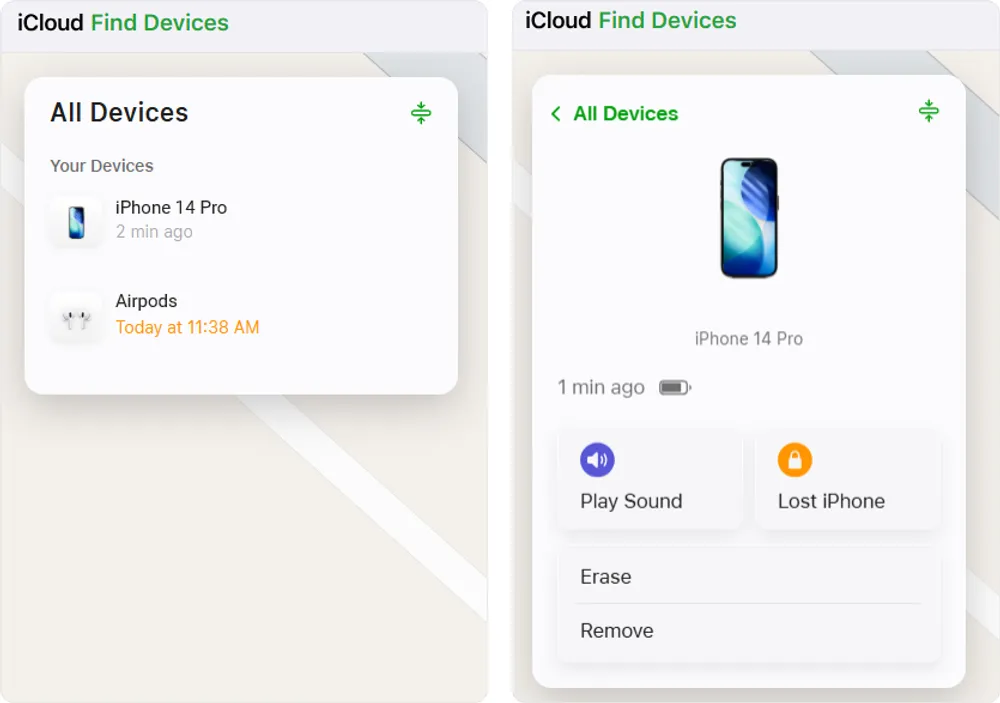
Step 1. Go to icloud.com/find and sign in with your Apple ID associated with the stolen iPhone.
Step 2. In the list of devices, select the stolen iPhone.
Step 3. Choose Erase iPhone and confirm your decision.
Erase Using Another Apple Device
Step 1. Open the Find My app on the device already signed in with the same Apple ID.
Step 2. Select your missing iPhone from the Devices list.
Step 3. Scroll down and tap Erase This Device. Confirm the erase.
Once the iPhone connects to the internet, the reset begins on its own. Your personal data is wiped clean, but the device stays locked to your Apple ID. Activation Lock still blocks setup, and no one can use the phone without your Apple ID and password.
Notes
The reset only starts when the iPhone goes online. If it stays offline, the erase waits until the next time it connects
If you change your mind, you can cancel the pending erase by selecting Stop Erase Request in Find My
Do not choose Remove Device if you want to keep tracking it and keep Activation Lock active. Removing it lets someone set it up as if it were theirs
Factory resetting a locked iPhone is possible, but that doesn’t mean they can use it. If you take the right steps fast, they get a wiped device that’s still permanently tied to your Apple ID. In other words, it becomes a useless brick with nice edges.
Why Thieves Can Reset the iPhone but Still Can't Use It
Activation Lock turns on automatically when you set up Find My. Even after someone resets your iPhone, the lock still requires your Apple ID and password before the phone can be set up again. Without those credentials, the thief can’t get inside, can’t activate it, and can’t turn it into their own device. This is exactly why Apple created it.
Can Activation Lock Be Bypassed
There are tools online claiming to remove Activation Lock. Experiences are all over the place. Some tools don't work at all, some only work on very old devices, and some create new problems you didn't ask for. If you’re worried, your best move is to reset your missing iPhone remotely as soon as possible.
You might not get the phone back, but that doesn't mean your data is gone forever. Gbyte is a professional iOS data recovery tool you can rely on even when your iPhone is stolen, lost, or broken.
How to Use Gbyte to Recover Your Data
Step 1. Install and open Gbyte Recovery on your computer, or visit its mobile web version.
Step 2. Choose Select All Types and click "Scan".
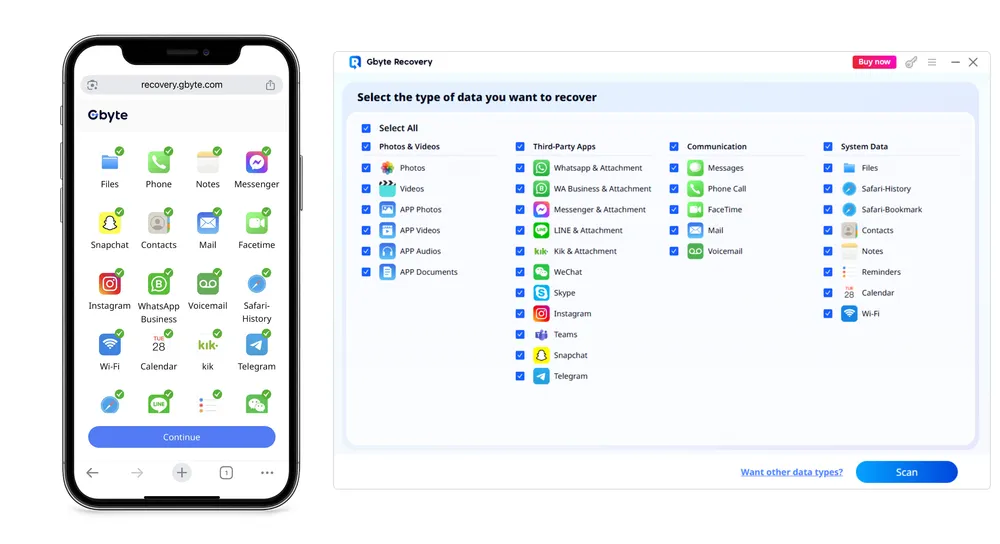
Step 3. Wait for the scan to complete. You’ll see all recoverable data listed on the results page.
Step 4. Preview and save the items you want directly to your computer or phone.
Gbyte can pull back a wide range of data that was stored in your iCloud and iPhone, including photos, messages, contacts, call logs, WhatsApp data, app files, and more.
If you prefer using Apple’s official recovery method, you can restore your data from an iCloud backup. Just remember this only works if a backup existed before your iPhone was stolen.
How to Restore Your Data Using Apple's Official Method
Step 1. On your new iPhone, turn it on and reach the Apps & Data screen. Note: If you want to restore on an iPhone that’s already set up, you need to reset it first so it returns to the Hello screen.
Step 2. Choose Restore from iCloud Backup.
Step 3. Sign in with the same Apple ID you used on your stolen iPhone.
Step 4. Pick the latest backup from the list.
Step 5. Wait for the restore to finish while the phone downloads your apps, photos, messages, and other synced data.
Mark the Device as Lost
Lost Mode locks your iPhone with your passcode and shows a message on the screen with your contact info. It also stops Apple Pay, blocks personal data, and prevents setup attempts. It’s the fastest way to block access and make the phone useless to whoever grabbed it.
Track the Device's Location
Once your iPhone is marked as Lost in Find My, you can see its location on a map whenever it’s online. This allows you to check if it’s nearby, moving, or possibly at a specific address. You can also enable notifications to alert you when the device’s location changes. Tracking is especially useful if you want to report the theft to local authorities or coordinate recovery safely.
Contact Your Carrier
Your carrier can disable your SIM, block calls and data, and prevent anyone from using your number for verification codes. This stops SIM swapping and keeps your accounts from being hijacked.
Erase the Data
If you’re sure the phone isn’t coming back, erase it remotely. This wipes your photos, messages, and personal files while keeping Activation Lock in place. The thief gets nothing except disappointment.
Restore from stolen phone
Restore What You Can From the Stolen Phone
Once you erase the device, you can recover your data from an iCloud backup or use a tool like Gbyte Recovery to pull back what's on that stolen iphone. The physical phone might be gone, but your important files don't have to disappear with it.
Not really. The only way to delay it is if the phone stays offline. The moment it connects to the internet, the erase goes through. Most thieves don’t have the patience to live in airplane mode forever.
No. Lost Mode locks your iPhone with a passcode and Activation Lock ensures that your Apple ID is still required after any reset. Without your credentials, thieves cannot access your data or set up the phone as their own.
If you act quickly and enable Lost Mode or remotely erase your device, your data remains safe. Activation Lock prevents unauthorized access, and wiping the phone removes sensitive information from the device.
Possibly. Find My lets you track your iPhone’s location in real time if it’s online. You can also receive notifications when it’s located. However, if the device is turned off or wiped, recovery might be impossible. Using tracking along with law enforcement is the safest approach.
Losing your iPhone can be stressful, but taking quick action makes all the difference. Use Find My to lock and erase your device, track its location, and protect your data. Even if you can’t recover the phone itself, tools like Gbyte ensure your important files aren’t lost forever. Stay calm, act fast, and remember that a stolen iPhone doesn’t have to mean lost data or peace of mind.
Gbyte Recovery
Don't wait until your data is gone forever! Try Gbyte iOS Recovery for free—scan first!
100% secure. Your data always stays private.
Share


Related articles


Subscribe Our Newsletter
For exclusive tutorials, product updates & phone tips, protect your data and prevent loss!
You can unsubscribe from our newsletter at any time by clicking the "Unsubscribe"link at the bottom of our emails.


Copyright @2026 Gbyte. All rights reserved.
The installation wizard will automatically start after downloading.
After registration, the recovery process can be managed through the web interface.
You get it all with your purchase - no locked features, no hidden limitations.