

Gbyte Repair

Gbyte Repair
Fix 150+ iOS issues yourself, no tech skills needed, no data loss
Table of contents
Quick Verdict: Does iMyFone Fixppo Really Work?
iMyFone Fixppo is a capable iOS system repair tool with Standard and Advanced repair modes. In our testing, Standard Mode successfully fixed an iPhone stuck in a boot loop without data loss, while Advanced Mode removed a forgotten screen passcode as expected, with device data erased.
Its repair workflow is straightforward, and free Recovery Mode entry and exit add useful value. Fixppo also offers several utilities beyond system repair. However, Monthly and Yearly plans are limited to one device, and the broader range of tools and options may be less intuitive for beginners who only need system repair.
Overall Rating: ★★★☆☆ (3.9/5)
Pros:
Straightforward, guided repair process
Free Recovery Mode entry and exit
Extra iOS utilities beyond system repair
Broad Apple device support
Cons:
Monthly and Yearly plans support only one device
More tools and options can make feature selection less clear for beginners
Occasional device recognition issues during testing
Recommended for:
Users who want a guided iOS system repair process
Users who want free Recovery Mode entry and exit
Users who also need utilities such as iOS upgrade/downgrade, Device Reset, and Data Backup & Restore
Not ideal for:
Users looking for a completely free iOS repair solution
Users who need to repair multiple devices at a similar or lower price
Users who prefer a more repair-focused tool with fewer additional options
Tester background: For this review, I evaluated iMyFone Fixppo's core iOS system repair capabilities, including Standard Mode and Advanced Mode, along with its one-click Enter/Exit Recovery Mode feature. The tests focused on whether Fixppo could handle common software-related issues that prevent an iPhone from starting normally or accessing the device.
Evaluation criteria: device detection, repair workflow, repair modes, firmware download, ease of use, data-loss warnings, extra tools, pricing, and license coverage.
Test scenarios: To evaluate Fixppo's different repair modes, I first tested Standard Mode on an iPhone stuck in a boot loop, as it is designed to fix common iOS issues while preserving user data. If Standard Mode could not resolve the issue, I would proceed with Advanced Mode. If the device was successfully restored, I created a separate forgotten-passcode scenario to evaluate Advanced Mode.
Test detail | Value |
Device | iPhone XR |
iOS version | 18.7.9 |
Computer | Windows 10 |
iMyFone Fixppo version | 9.4.3 |
Test Scenario 1 | iPhone stuck in a boot loop (repeatedly restarting and unable to reach the Home Screen) |
Test Scenario 2 | Forgotten screen passcode (if Scenario 1 succeeds) |
Repair mode used | Scenario 1: Standard Mode (Advanced Mode if Standard Mode fails); Scenario 2: Advanced Mode |
Recovery Mode Access | Free one-click Enter/Exit Recovery Mode |
Test date | August 5, 2026 |
Before testing, I looked into what iMyFone officially claims Fixppo can do. It positions itself as an iOS system repair tool with an "up to 99.99% success rate" and a range of repair and device utilities. In this review, I mainly focus on its iOS system repair-related features.
Feature | What iMyFone Claims |
Fix iOS System Issues | Fixes 150+ iOS/iPadOS/tvOS issues with Standard and Advanced Repair modes |
Recovery Mode | Free one-click Enter/Exit Recovery Mode |
iOS Upgrade/Downgrade | Upgrades or downgrades iOS/iPadOS without jailbreak |
iTunes Error Fix | Fixes 200+ iTunes errors |
Reset Devices | Factory resets iOS devices without iTunes or Finder |
Success Rate | Up to 99.99% repair success rate |
Data Safety & Privacy | Claims 100% data privacy protection and no jailbreak risk |
Refund Policy | 30-day money-back guarantee |
Device Compatibility | Supports iPhone, iPad, iPod touch, and Apple TV |
Since iMyFone Fixppo is a third-party iOS system repair tool, not an Apple official method, I, as a new user, was concerned about its safety — specifically, whether it might damage my computer or my iPhone, steal my Apple ID, jailbreak my device, or trigger Activation Lock. Therefore, I paid close attention to the following items during testing to check whether Fixppo is legit and safe to use.
Security Aspect | Evaluation |
Apple ID safety | Does not require your Apple ID or password at any step |
Jailbreak risk | Repair process ≠ jailbreak; no jailbreak involved or required |
Activation Lock / bricking risk | Cannot bypass Activation Lock or Apple ID passwords — device won't be "unlocked" or bricked |
Official download source | Downloaded from iMyFone's official website |
Software legitimacy | iMyFone provides an official website, product documentation, and customer support resources |
Safe to download | No intrusive ads during download/install/use — only a discount pop-up when exiting. No malware flagged by antivirus |
Privacy protection | iMyFone provides a Privacy Policy explaining what user information is accessed, collected, and processed |
Data loss risk | Depends on the repair mode selected |
Pricing transparency | Recovery Mode access is clearly marked Free; paid features trigger a subscription pop-up immediately — no risk of accidental charges |
To see how Fixppo performs in actual use, I tested its Standard Mode, Advanced Mode, and free one-click Enter/Exit Recovery Mode feature.
iMyFone Fixppo works by detecting your connected iPhone or iPad, matching it with the correct iOS firmware package from Apple's servers, and using that firmware to reinstall or repair the device's system partition — the read-only portion of iOS that stores the operating system files, not user content. This is different from modifying the kernel or gaining root access (which is what jailbreaking does); Fixppo simply replaces corrupted or missing system files with clean ones from official firmware.
This system-vs-data separation is also why the two repair modes behave so differently:
Standard Mode only reinstalls the system partition, leaving the data partition (photos, apps, settings, messages) untouched. This is why it can fix issues like white screen, boot loops, or update failures without erasing your data — it's essentially a "system-only reinstall."
Advanced Mode performs a full firmware reinstall similar to a DFU restore, which reformats the entire device, including the data partition. This is why it requires and results in a complete data wipe. It's typically used when Standard Mode fails, or when the device is more severely corrupted (e.g., stuck in Recovery Mode, unresponsive to Standard repair).
According to iMyFone, Advanced Mode can also restore access to a device with a forgotten screen passcode — but this works by wiping and reinstalling the OS (similar to erasing via Find My/iTunes), not by bypassing Activation Lock or the Apple ID password. If Activation Lock is enabled, the device will still require the original Apple ID after the repair.
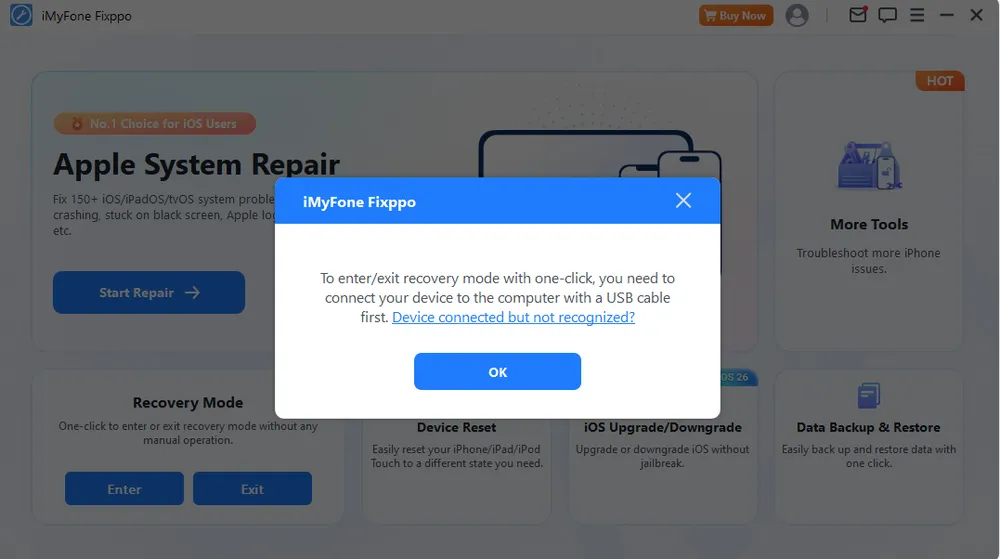
Before starting the repair, I tried Fixppo's one-click "Enter Recovery Mode" feature. However, since the device wasn't functioning normally, Fixppo failed to detect the iPhone, and clicking the button only showed a message telling me to connect the device to the computer with a USB cable.
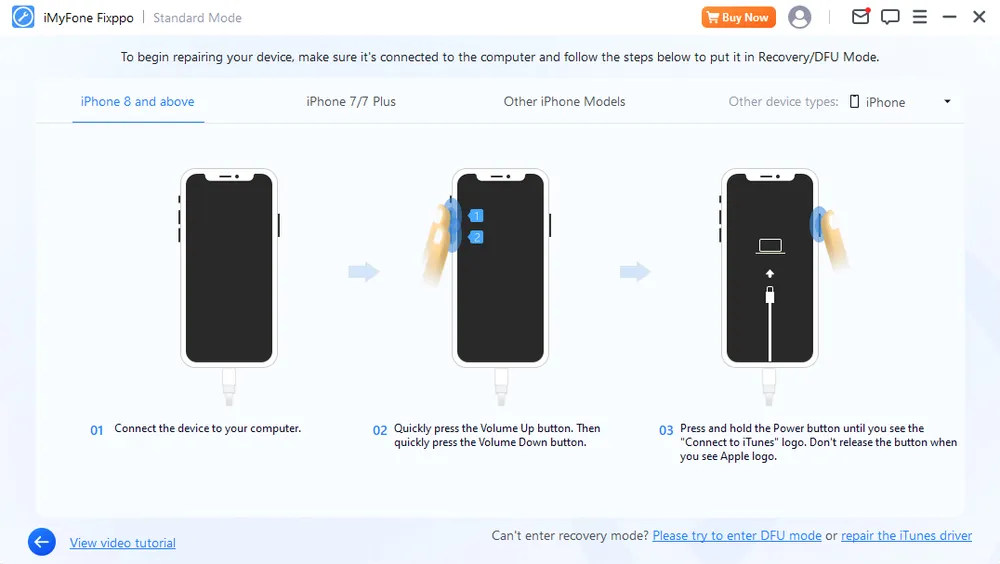
Since the software couldn't detect my iPhone in its current state, I then tried clicking "Start Repair" instead and selected Standard Mode. This time, the software displayed instructions for manually putting the iPhone into recovery mode. After I followed those steps, the software was able to detect the device, and I continued testing from there.
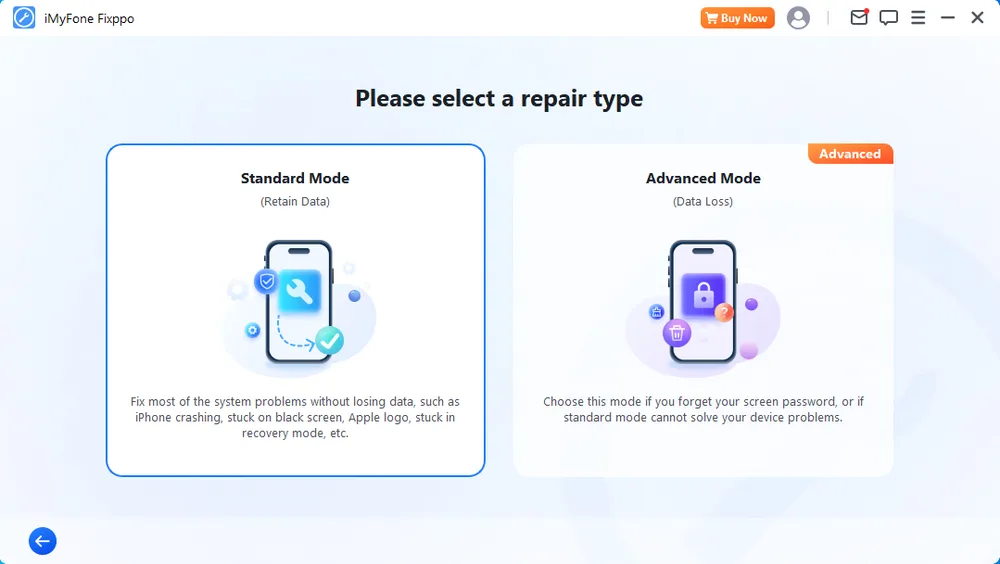
I started with Standard Mode because it is Fixppo's recommended non-destructive repair option.
Steps followed:
Download and install Fixppo. Connect the test device to the computer with a USB cable, then launch Fixppo.
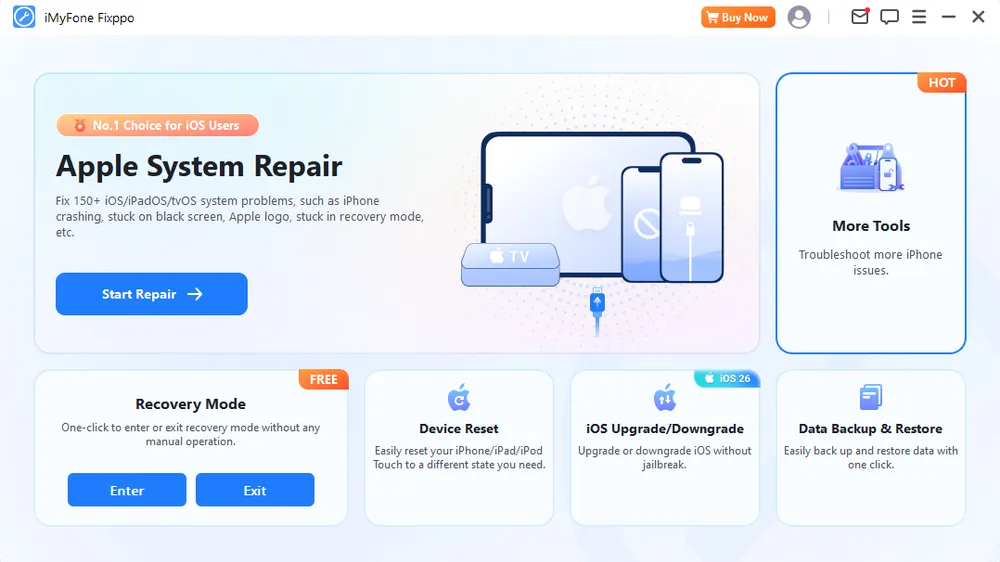
Click "Start Repair" and select Standard Mode.
Manually enter recovery mode by following the on-screen instructions. Once the device is recognized, the software automatically matches the required firmware. Click "Download" and wait for it to finish.
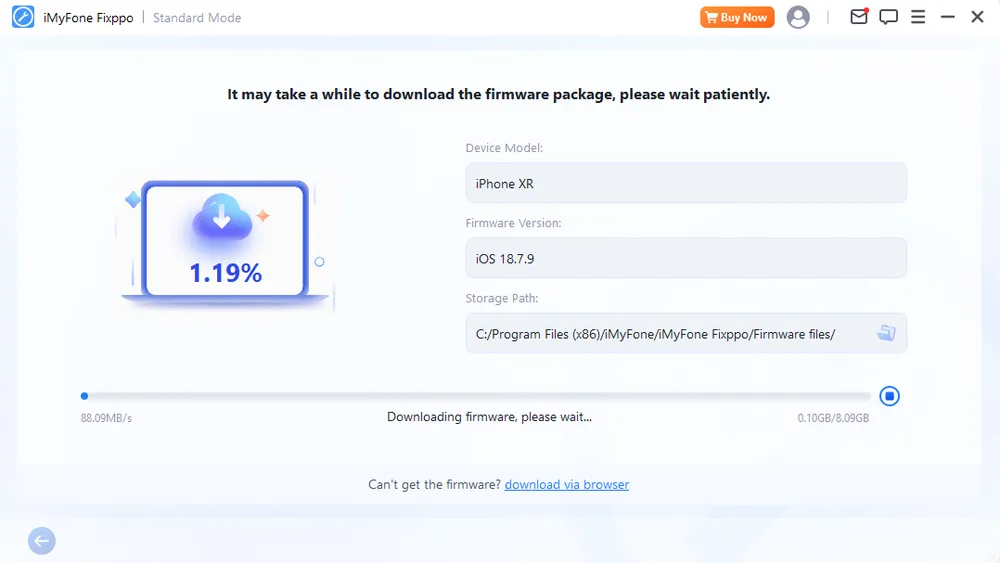
Once the firmware is ready, click "Start Standard Repair" and wait for the process to complete.
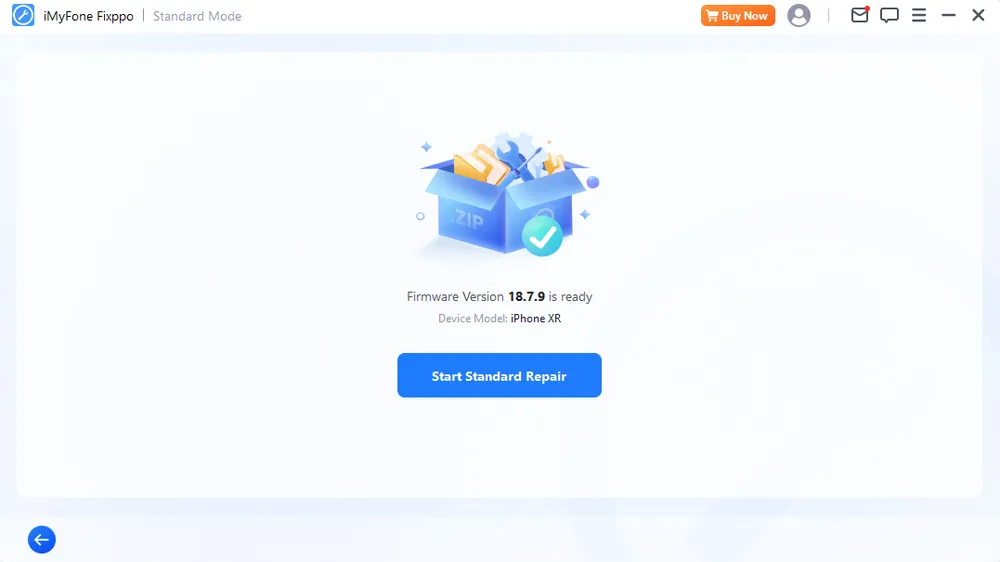
Results
Item | Result |
Repair status | Successful |
Device boot | Returned to the Home Screen |
Data loss | No |
Setup required | No |
Repair time | 15 min (including firmware download) |
After the standard repair, my iPhone was able to start up and work normally. I checked my photos and confirmed all of them were retained. No other issues were found.
At this point, I also re-tested the one-click Enter/Exit Recovery Mode feature. Since the iPhone was now working normally, I simply entered the passcode and trusted the computer, and the iPhone showed the "Connect to Computer" icon. Entering recovery mode took around 10 seconds, and exiting took around 20 seconds — confirming this feature works and is available for free.
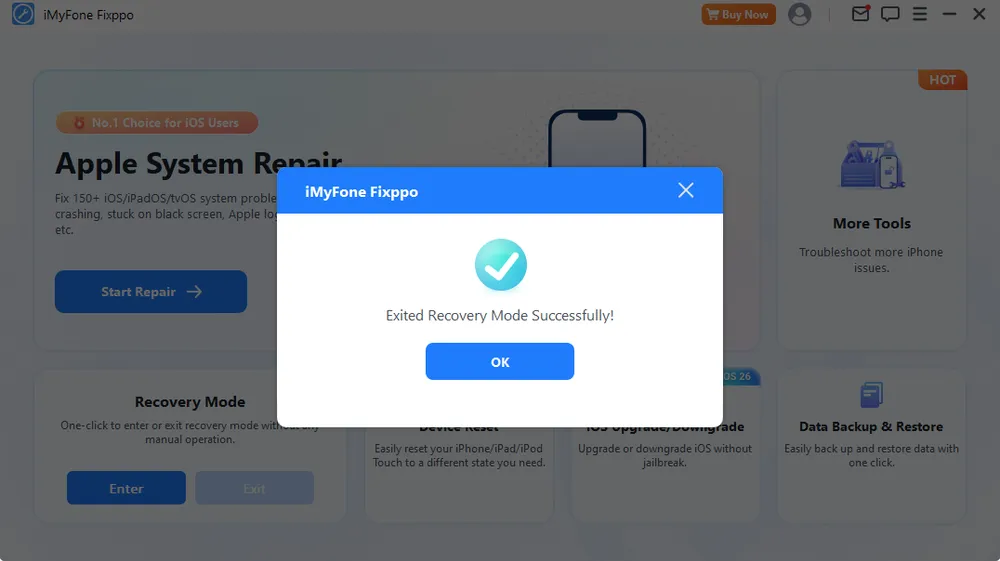
Next, to test Advanced Repair, I used the same iPhone and treated it as if I had forgotten its passcode. Since this device had a backup, data loss was not a concern for this test.
As Standard Mode successfully repaired the device in Test 1, I used the same iPhone to test Advanced Mode, which Fixppo indicates is suitable for scenarios such as a forgotten screen passcode.
Since I had already downloaded the matching firmware package during Test 1, I deleted the IPSW file from my computer beforehand, in order to record the complete time it takes to run Advanced Mode from start to finish (including the firmware download).
The steps followed were the same as in Standard Mode, with only the mode selection changed.
Results
Item | Result |
Repair status | Successful |
Device boot | Returned to the Hello screen |
Data loss | Yes |
Setup required | Yes |
Previous passcode deleted | Yes |
Repair time | 21 min (including firmware download) |
The repair completed successfully, and the device booted to the "Hello" setup screen, confirming that all data had been erased as expected for this repair mode.
The repair time in this test was slightly longer than in Test 1.
Overall, the testing process went smoothly without significant delays or freezing. The boot loop issue was successfully resolved using Standard Mode, and the forgotten passcode scenario was successfully resolved using Advanced Mode. Additionally, the one-click Enter/Exit Recovery Mode feature is indeed free, as claimed.
However, a few issues came up during testing.
Device recognition issue. After the device successfully booted up from the repair, I changed the trust settings and reconnected the iPhone via USB. However, the software failed to detect the device. I tried unplugging and reconnecting, as well as switching USB ports, but neither worked — this happened twice in a row. The device was only detected after I closed and relaunched the software. In addition, the only indication of successful detection was a small pop-up notification in the bottom-right corner of the desktop; the main interface itself did not display the connected device's model.
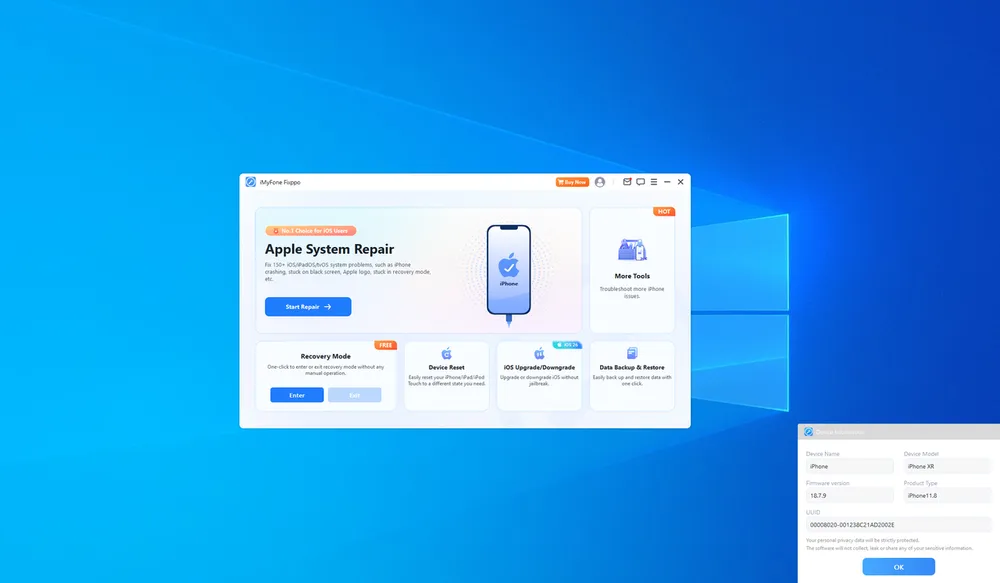
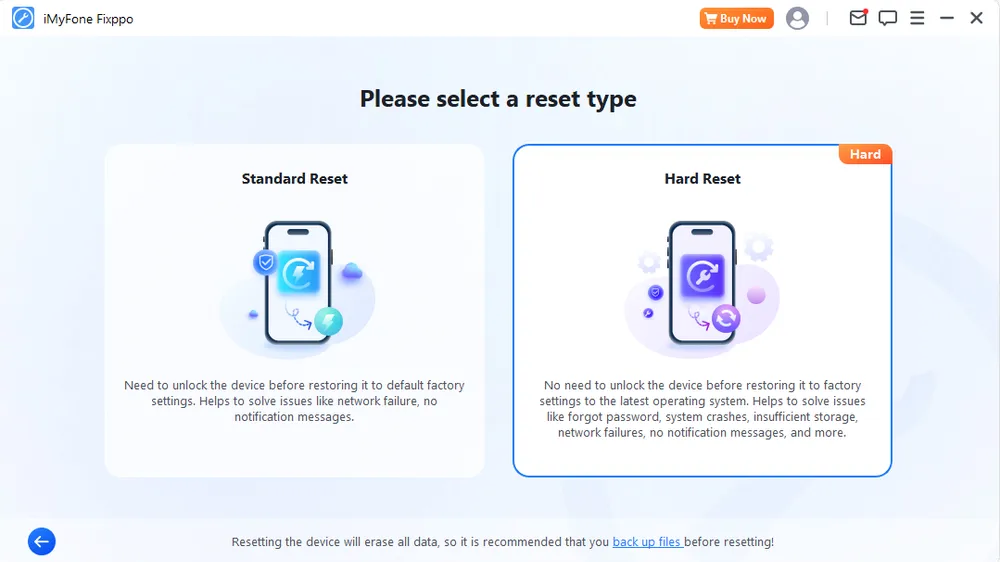
Overlapping options for some scenarios. Fixppo offers several tools beyond its main repair modes. For example, during the forgotten passcode test, Advanced Mode was able to remove the screen passcode, while the separate "Device Reset" feature also offers a "Hard Reset" option for forgotten-passcode scenarios. Both erase device data. This overlap may make it less obvious which option to choose for users who are unfamiliar with iOS repair tools.
Test Limitations
It's also worth noting that iMyFone's official website claims a 99.99% success rate for Fixppo. However, this testing was based on a single device and a limited set of scenarios, so the results here cannot be taken as representative of Fixppo's performance across all devices, iOS versions, or issue types.
What's actually free:
Enter / Exit Recovery Mode
What requires a paid plan:
Standard Mode / Advanced Mode
iOS upgrade/downgrade
Device reset
Data backup & restore
If your iPhone is only stuck in Recovery Mode, Fixppo's free version can already resolve this. However, if you need to actually repair the device or use other features beyond that, a paid plan is required.
Pricing checked: September 1, 2026. Prices and plan details may change.
Fixppo offers Basic, Full Toolkit, and Business plans. For individual users, the main choice is between Basic and Full Toolkit:
Basic: Includes Fixppo's core repair features, Recovery Mode, iOS upgrade/downgrade, Device Reset, and Data Backup & Restore.
Full Toolkit: Includes all Basic features plus additional iMyFone utilities for tasks such as screen/Apple ID unlocking and MDM removal.
Plan | Term | Price | Devices | Renewal | Feature Updates |
Basic | 1 Month | $29.99 | 1 | Auto-renewal | — |
Basic | 1 Year | $49.99 | 1 | Auto-renewal | 12+3 months |
Basic | Lifetime | $59.99 | 5 | One-time | Lifetime |
Full Toolkit | 1 Month | $49.99 | 1 | Auto-renewal | — |
Full Toolkit | 1 Year | $79.99 | 1 | Auto-renewal | 12+3 months |
Full Toolkit | Lifetime | $89.99 | 5 | One-time | Lifetime |
For users who mainly need iOS system repair, the Basic plan should be sufficient. It includes Fixppo's core repair modes along with Recovery Mode, iOS upgrade/downgrade, Device Reset, and Data Backup & Restore.
The Full Toolkit is more suitable if you also need additional iMyFone utilities, such as screen or Apple ID unlocking and MDM removal.
One limitation to consider is device coverage: both Monthly and Yearly plans support only one iOS device, while the Lifetime plans support up to five devices.
Clear repair guidance — The repair workflow is easy to follow, with step-by-step instructions when manual Recovery Mode entry is required.
Extra utilities beyond system repair — Fixppo includes iOS upgrade/downgrade, Device Reset, and Data Backup & Restore, with access to additional iMyFone tools from the interface.
Free Recovery Mode entry and exit — Both Enter and Exit Recovery Mode are available for free and worked successfully in my test.
Competitive lifetime pricing — The Basic lifetime plan costs $59.99 and supports up to 5 iOS devices.
Occasional device recognition issues — The software sometimes failed to detect the device after reconnecting via USB, requiring a software restart to resolve.
Feature overload for some users — Some features address similar scenarios, which can make it less obvious which option to choose.
Limited device coverage on shorter plans — The Monthly and Annual Basic plans support only 1 iOS device.
iMyFone's refund policy applies at the company level rather than being product-specific — the official policy states plainly that "iMyFone provides a 30-day Money Back Guarantee," so this applies to Fixppo as well.
According to the policy, Fixppo is covered by a 30-day money-back guarantee, and orders cannot be canceled once this period has expired, since the policy is designed as a "try-before-you-buy" system. Refunds are only granted under specific circumstances, most notably when the purchased software has an unresolved, terminal technical problem that iMyFone fails to fix within 30 days — in which case a refund will be issued if the customer is unwilling to wait for a further update. A refund also applies to accidental or unintended purchases of add-on services, such as the Extended Download Service or Registration Backup Service.
In addition, the 30-day money-back guarantee is conditional rather than an unconditional trial period. A failed repair attempt does not automatically qualify for a refund; users may need to provide details about unresolved technical issues and allow iMyFone an opportunity to assist before a refund is considered. Certain situations are also explicitly excluded from the guarantee, including refund requests related to credit card fraud or unauthorized payments.
Users can review the complete refund terms on iMyFone's official refund policy page.
Overall, user feedback about iMyFone as a company is mixed but generally leans positive. Many users appreciate its wide range of software tools and the convenience of its products.
However, refund-related experiences appear to be a recurring concern among some users. These complaints are not specific to Fixppo alone but are related to iMyFone's overall refund process.
Some users have reported that refunds were not always issued as a full refund. For example, several reviewers claimed they were offered partial refunds instead of the full amount they expected, including cases where users stated that the software did not resolve their device issues.
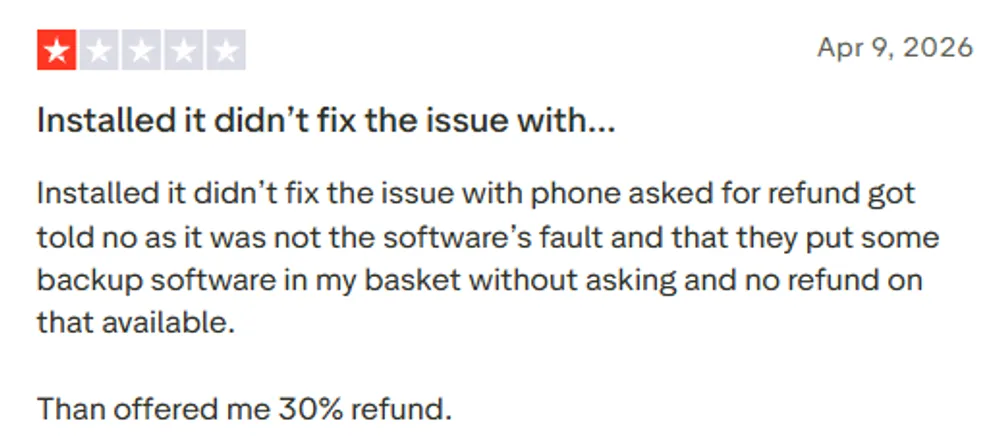
Other users have also mentioned that the refund process could be time-consuming, requiring multiple follow-ups, and that some refund requests were initially rejected before being reconsidered.
Because these experiences are based on company-level customer feedback rather than Fixppo-specific reviews, they should be considered as general purchasing considerations rather than a direct evaluation of Fixppo's repair performance.
If you are considering purchasing iMyFone Fixppo, it is recommended to review the official refund policy carefully before buying. During the usage process, keep relevant records such as order information, error messages, screenshots, and communication records with customer support in case you need to request assistance or a refund.
I only tested Fixppo's core iOS system repair features, so the findings below are limited to the features and scenarios covered in this review.
Official Claim | What I Found |
No jailbreak required | ✅ Confirmed in our test — no jailbreak was needed during the repair process |
Recovery Mode entry/exit is free | ✅ Confirmed — no payment was required to enter or exit Recovery Mode |
Standard Mode repairs without data loss | ✅ Confirmed in our test — the boot loop was resolved and device data remained intact |
Advanced Mode can remove a forgotten passcode | ✅ Confirmed in our test — the passcode was removed, but all device data was erased as expected |
Up to 99.99% repair success rate | ⚠️ Could not verify — two scenarios on one device are not enough to confirm or refute this figure |
30-day money-back guarantee | ⚠️ Policy exists, but eligibility is subject to iMyFone's refund terms |
Based on my hands-on testing, along with Fixppo's current features, pricing, and policies, here’s how I’d rate it across the key areas that matter most when choosing an iOS system repair tool.
Category | Rating | Notes |
Ease of Use | ★★★★★ | The core repair workflow is straightforward, with clear step-by-step guidance throughout the repair process. |
Beginner-friendly | ★★★☆☆ | The repair process itself is well guided, but overlapping tools and options can make feature selection less obvious for beginners. |
Repair Capability | ★★★★☆ | Standard and Advanced Modes cover different levels of iOS system issues, and both worked successfully in our limited testing. |
Data Safety | ★★★★☆ | Standard Mode preserved device data in our test, while Advanced Mode clearly warns that it will erase data before repair. |
Free Feature Value | ★★★☆☆ | Entering and exiting Recovery Mode is genuinely free, but actual iOS system repair requires a paid license. |
Pricing Value | ★★☆☆☆ (2.5) | Monthly and Yearly plans support only one iOS device, limiting their value, although the Lifetime plan offers better coverage for up to five devices. |
Refund & Customer Support | ★★★☆☆ | A 30-day money-back guarantee is available, though third-party user feedback on the refund experience is mixed. |
Overall Rating | ★★★☆☆ (3.9) | Fixppo offers capable iOS system repair with a straightforward workflow and useful extra features, but pricing, device limits, and some overlapping tools reduce its overall value. |
Users who want a guided iOS system repair process with Standard and Advanced repair options.
Users who want free Recovery Mode entry and exit without purchasing a license.
Users who also need iOS utilities beyond system repair, such as upgrade/downgrade, Device Reset, or Backup & Restore.
Users looking for a completely free iOS repair solution — actual system repair requires a paid license.
Users who need to repair multiple devices on a Monthly or Yearly plan — both are limited to one iOS device.
Users who prefer a more repair-focused interface with fewer overlapping tools and options.
While iMyFone Fixppo is a capable iOS repair tool, it may not be the best fit for every user. Its one-device limit on Monthly and Yearly plans, pricing, and broader set of utilities may be less appealing to users who mainly need straightforward iOS system repair.
For users looking for a more repair-focused option with greater device coverage per license, Gbyte Repair is a strong alternative to consider.
Like Fixppo, Gbyte offers two repair paths. Standard Repair is designed for common iOS system issues, while Deep Repair operates through DFU Mode for more severe system problems. In both repair paths, users can choose Keep Data or Erase Data before starting the repair.
Both Fixppo and Gbyte provide free Recovery Mode entry and exit. Fixppo, however, offers a broader set of built-in utilities, including Device Reset and Data Backup & Restore.
Fixppo also has broader platform support, while Gbyte Repair is currently available for Windows. This makes Fixppo the more flexible option for users who need support across different computer platforms, while Gbyte is primarily suited to users repairing an iPhone or iPad from a Windows PC.
Both Gbyte iOS System Repair and iMyFone Fixppo aim to solve iOS system problems without requiring users to rely entirely on Apple's built-in troubleshooting methods. However, they differ in many aspects.
Feature | iMyFone Fixppo | Gbyte Repair |
Available for | Windows / Mac / Android / iOS app | Windows |
Supported Apple devices | iPhone, iPad, iPod touch & Apple TV | iPhone & iPad |
Standard Repair | Repairs common iOS issues without data loss | Supports Keep Data or Erase Data |
Advanced / Deep Repair | Advanced Mode erases device data | Deep Repair in DFU Mode supports Keep Data or Erase Data |
Free Recovery Mode Entry/Exit | ✅ | ✅ |
Extra Utilities | ✅ iOS upgrade/downgrade, Device Reset, Data Backup & Restore, plus access to other iMyFone tools | ✅ iOS upgrade/downgrade, Repair Apple USB Driver |
Repair Experience | Guided workflow with a broader range of features and options | More streamlined for beginners, with a direct Standard Repair path and a clearly labeled professional DFU repair option |
Monthly Plan | $29.99 Basic / $49.99 Full Toolkit — 1 device | $24.99 — 5 devices |
Annual Plan | $49.99 Basic / $79.99 Full Toolkit — 1 device | $44.99 — 6 devices |
Lifetime Plan | $59.99 Basic / $89.99 Full Toolkit — 5 devices | $69.99 — 8 devices |
Both iMyFone Fixppo and Gbyte iOS System Repair can handle common iOS system issues, but they are designed for slightly different types of users.
Choose iMyFone if:
You prefer a more established and widely known iOS software brand.
You need broader platform or Apple device support, such as macOS, iPod touch, or Apple TV.
You want more utilities beyond iOS system repair, including Device Reset and Data Backup & Restore, with access to other iMyFone tools for tasks such as unlocking and location changing.
Choose Gbyte if:
You mainly want a simpler iOS system repair tool without a broad set of additional utilities.
You want the flexibility to choose Keep Data or Erase Data in both Standard and Deep Repair.
You want more device coverage per license at a lower or comparable price, especially on Monthly and Lifetime plans.
It depends on the mode. Standard Mode does not erase data — it only repairs the system partition. Advanced Mode erases all data, since it performs a full system reinstall similar to a DFU restore.
Fixppo's Standard Mode has an edge because it can fix many iOS issues without erasing data, which iTunes Restore cannot do — iTunes only offers a full restore that wipes the device. However, iTunes remains a free, Apple-official option, so users who don't mind data loss and want to avoid third-party software may still prefer it.
Fixppo offers some free features, such as one-click Recovery Mode entry and exit. However, iOS system repair features, including Standard Mode and Advanced Mode, require a paid license.
Yes. Fixppo can repair a wide range of software-related issues, including black screen, iPhone stuck on the Apple logo, boot loops, recovery mode loops, and failed update errors — usually via Standard Mode without erasing data.
No. Fixppo only resolves software-related iOS problems. It cannot fix hardware issues such as battery failure, logic board damage, cracked screens, or water damage — for these, you'll need Apple Support or an authorized repair service.
You can check the supported device list on iMyFone's official website or connect your device to Fixppo to let the software automatically detect compatibility. Fixppo supports various Apple devices, including iPhone, iPad, iPod touch, and Apple TV.
Standard Mode is designed to fix common iOS system issues while keeping user data intact. Advanced Mode performs a deeper system reinstall and can fix more severe issues, but it requires erasing all data on the device.
 Add Gbyte as a preferred source on Google
Share


Related articles


Copyright ©2026 Gbyte. All rights reserved. Gbyte’s software is not developed by or affiliated with Apple Inc.
The installation wizard will automatically start after downloading.
After registration, the recovery process can be managed through the web interface.
You get it all with your purchase - no locked features, no hidden limitations.